Change is still the most reliable way to break production, and the calendar does not change that. What the holidays change is the price: a bad deploy during Black Friday or Cyber Monday (27 and 30 November in 2026) costs the most revenue, in the weeks your team is thinnest. A change freeze is the cheapest protection you can buy, as long as it is a real control and not a memo. This post is written mainly for DevOps and release engineers who still need to ship safely during peak.
Holiday Readiness series, part 4 of 8. Not sure where to start? Take the free Holiday Readiness Assessment and get a prioritized checklist by email.
Direct Answer
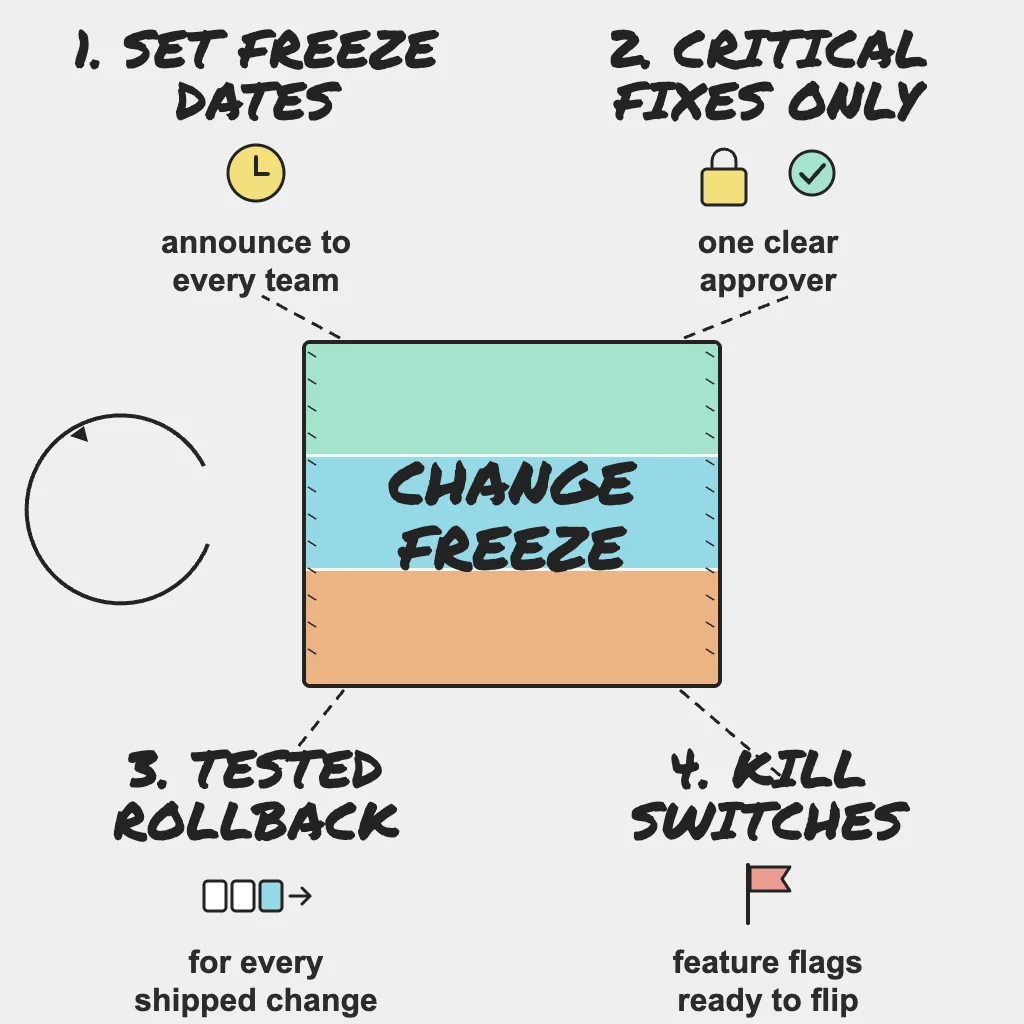
- Set code and configuration freeze dates covering the peak window, and announce them to every team that can change production.
- Define a critical fix and name who can approve one.
- Require a tested rollback plan for every change that ships during the freeze.
- Move migrations, major upgrades and DNS changes to before the freeze or after the season.
- Treat configuration, infrastructure, vendor settings and provider maintenance as changes, not just code.
- Put risky features behind flags so you can switch them off instead of deploying a fix.
Why This Matters
During peak, traffic is high, on-call engineers may be covering for colleagues on holiday, and an hour-long rollback costs an hour of the busiest sales days of the year. A freeze also shortens the list of suspects: when something breaks, the cause is traffic, a provider, or one of a handful of approved changes.
A freeze does not mean nothing ships. It means what ships is small, approved, reversible and watched.
Set and Announce the Freeze
Pick the dates
Start early enough that the last normal release settles before the first major sales date, and run through the last shipping cutoff. Consider two stages:
- Soft freeze: No new features or large refactors. Bug fixes and small changes still go through normal review.
- Hard freeze: Only critical fixes, through the exception process below.
Defuse the pre-freeze rush
The riskiest week of the season is often the one before the freeze, when every team tries to land everything at once. Set a "last train" date for large changes well before the soft freeze, keep releases small, and give each one a normal traffic cycle to prove itself.
Announce it and enforce it
Publish the dates in the engineering channel, the release calendar and the deploy tooling. Tell marketing, support, data and any agency or contractor with production access, including the exception process and approvers.
Enforce it where you can. An approval gate in the deploy pipeline is more reliable than a message people may not read.
Field note: A freeze that lives in an email gets broken by the team that did not read it. Treat freeze gates, rollback tooling and flag controls as part of the platform, built once into the paved road every team deploys through, rather than a process each team reinvents every November.
Define Critical Fixes and Approvals
Without a clear definition, every change becomes "critical" by the second week.
A practical definition of a critical fix:
- It fixes an active or likely customer-facing problem on a revenue path (login, cart, checkout, payment).
- It closes a security vulnerability.
- It meets a legal or compliance deadline inside the freeze.
Everything else waits. Name one or two approvers per area, with backups who are not on holiday at the same time. Each request should state what is changing, why it cannot wait, how it was tested, how it will be rolled back, and who will watch it. Keep requests and approvals in one place for the post-season review.
Make Every Change Reversible
Tested rollback, not a theoretical one
"We can just roll back" is not a plan unless someone has done it. For every exception, test the rollback in staging first and record how long it took and the exact steps.
Watch for changes that cannot really be undone. If new code writes data the old code cannot read, rolling back the binary leaves you with incompatible data, and your "rollback" becomes a data migration under pressure. Prefer changes that roll back cleanly: code without schema changes, flag flips, and configuration restored from version control.
Ship small and watch closely
- Deploy during staffed hours, never at the end of a shift or before a long weekend.
- Use canary or staged rollouts so a bad change reaches a small share of traffic first.
- Agree in advance which signals mean "roll back now," such as error rate, checkout success or response time crossing a set threshold.
- Have the author and an on-call engineer watch the change after it ships.
External monitoring is a useful second opinion. PingAlert uptime checks from multiple regions, with confirmation before alerting, plus multi-step checks on login and checkout, show whether customers can still buy after a deploy, not just whether the server returned a 200.
Postpone High-Risk Work
Some work does not belong near peak, even with a rollback plan:
- Database migrations and schema changes. Hard to reverse, and they can lock tables under load. If one is unavoidable, use an expand and contract approach: add the new structure in a backward-compatible way first, and remove the old one after the season.
- Major library, framework, runtime or database upgrades. Behavior changes often appear only under real traffic.
- DNS changes. Caching makes them slow to apply and slow to undo. If you might need to repoint a record during peak (for failover, say), lower its TTL before the freeze, because the TTL change is itself a change.
- Infrastructure migrations, such as moving regions, clusters or providers.
If one must happen, do it well before the freeze and watch it through a normal traffic cycle.
Configuration Counts as Change
Many freeze breaches are not code. Treat these as changes needing the same approval and rollback plan:
- Load balancer, CDN, WAF and firewall rules.
- Autoscaling settings, quotas and instance types.
- Feature-flag targeting rules and percentage rollouts.
- Environment variables, secrets, API keys and connection strings.
- Payment, tax, shipping and email provider settings in vendor dashboards.
- DNS records and TTLs.
Some changes arrive without anyone on your team pressing deploy. Check managed database maintenance windows, Kubernetes and node auto-upgrades, and dependency bots that auto-merge, and reschedule or pause them for the window.
Credentials deserve special attention. Every API key, webhook secret and identity provider certificate is a trust boundary, and one that expires mid-freeze forces an emergency rotation with no rehearsal. Rotate anything expiring in the window before the freeze starts.
Keep configuration in version control, and snapshot vendor dashboard settings before the freeze so you know what "good" looked like.
Feature Flags as Kill Switches
Switching a flag off is faster than deploying, which makes flags the safest way to change behavior during a freeze.
- Put new or risky features behind flags before the freeze, not during it.
- Add kill switches for heavy, non-essential features such as recommendations, reviews and live chat, so they can be turned off if they slow checkout.
- Decide who can flip each switch and document it in the runbook.
- Test each switch before the season and confirm the page works with the feature off.
- Know what your flag SDK does if the flag service is unreachable, and make sure the default is the safe state.
- Log every flag change with a timestamp so incident timelines show what changed and when. PingAlert incident timelines and alert routing to Slack or Teams make it easier to line those changes up against when monitors started failing.
Who Owns What
- SRE: Defines rollback signals, watches deploys during the freeze, and keeps external monitoring on revenue paths.
- DevOps: Owns the freeze calendar, enforces it in the deploy pipeline, runs the exception process and verifies rollback plans.
- Platform: Builds freeze gates and flag controls into the shared deploy path, brings infrastructure, configuration and provider maintenance under the freeze, and rotates credentials before it starts.
- Product: Agrees what counts as critical, approves business-driven exceptions, and decides which features have kill switches and can be turned off at peak.
Practical Checklist
- Set a last-train date, plus soft and hard freeze dates covering your peak and last shipping cutoff.
- Announce dates, process and approvers to every team with production access.
- Add an approval gate to the deploy pipeline for the freeze window.
- Publish a definition of a critical fix, with named approvers and backups.
- Require a tested, timed rollback for every exception, and check for data that cannot roll back.
- Deploy exceptions during staffed hours with staged rollout and agreed rollback signals.
- Move migrations, major upgrades, DNS and infrastructure changes outside the freeze, and lower TTLs you may need to change.
- Treat configuration, flags, secrets and vendor settings as changes, and record current settings.
- Pause provider maintenance, auto-upgrades and auto-merge bots for the window.
- Rotate credentials that expire during the freeze before it starts.
- Add and test kill switches with safe defaults, and log all exceptions and flag changes.
Reader Questions, Answered
How long should a holiday change freeze last?
Long enough to cover your peak sales days and last shipping cutoff, plus a settling period before the first big date, based on your own order data.
Can we still deploy during a change freeze?
Yes, but only critical fixes signed off by a named approver, with a tested rollback and someone watching after release.
Are configuration changes covered by the freeze?
Yes. Load balancer rules, flag targeting, secrets and vendor settings break production as easily as code.
What if a certificate or domain expires during the freeze?
Renew it before the freeze if you can. Otherwise, treat the renewal as a planned critical change and confirm it with SSL and domain expiry monitoring.
Wrap Up
A good change freeze is not a ban on shipping. It is a short list of approved, reversible, watched changes during the weeks when mistakes cost the most, enforced by tooling rather than goodwill. If a change cannot be rolled back in minutes by the person on call, it can wait until January. Take the Holiday Readiness Assessment to check whether your freeze and rollback plans are ready for peak.
Holiday Readiness Series
- The peak-season reliability playbook
- When third-party providers fail at peak
- Capacity: quotas, connection limits and rate limits
- Change freeze and release safety (you are here)
- Holiday website monitoring checklist
- On-call, runbooks and incident communication
- Unexpected traffic: load testing and graceful degradation
- After the peak: post-incident reviews
Previous: Capacity: quotas, connection limits and rate limits · Next: Holiday website monitoring checklist
Related guides:
- Incident management workflow: the first 30 minutes
- How synthetic monitoring helps and why it is important
Sources and references
- This post is based on PingAlert's holiday readiness checklist and holiday website monitoring guidance.
- Google SRE Book: Release Engineering
- Google SRE Workbook: Canarying Releases